All Blog Posts
December Product Updates



We're excited to announce our latest product updates, featuring powerful new capabilities designed to help you mobilise workers faster, improve operational efficiency, and deliver measurable business impact.
This release brings the MyPass Skills Passport mobile app to New Zealand, introduces five new platform features, and enhances the mobile experience for all users. Let's dive into what's new:
We're thrilled to announce that the MyPass Skills Passport mobile app is now available for workers in New Zealand.
The app makes it effortless for workers to manage their own compliance – from uploading certifications to responding to role invitations – all from their mobile device. This means faster worker mobilisation, reduced administrative workload, and shorter time to productivity.

For all users:
Push Notifications
Workers now receive instant alerts directly to their mobile device when:
No more missed deadlines or last-minute compliance scrambles.
Biometrics Sign-In
Workers can now sign in quickly and securely using:
One tap and they're in – no more forgotten passwords or login friction.
Getting started
Workers in New Zealand can download the free MyPass Skills Passport app from the App Store or Google Play Store. Australian workers should update their existing app to access the new features.

The challenge
The lack of control over role and occupation taxonomy has been a persistent challenge for admins. Inconsistent role naming leads to:
The solution
The Job Catalogue empowers admins to build and enforce their own standard taxonomy. Create customised job lists specific to your organisation, then require users to select role names from your Job Catalogue when creating project roles.
Key capabilities
Build your taxonomy
Enforce consistency
Business impact
By standardising role naming conventions, you'll improve:
Supplier Contacts: Find the Right Person, Fast

The Challenge
Project admins often need to review worker compliance status before confirming them to site. When issues arise – missing documents, expired certifications, unclear information – admins waste valuable time:
The Solution
MyPass now displays contact information for the supplier admin who proposed each worker directly within the worker's project information.
How it works
When viewing a worker's role details or compliance status, you'll see:
Business impact
This feature is particularly valuable during peak mobilisation periods when efficient communication between admins and suppliers is critical.
Project Documents: Centralise Supplier Documentation

The challenge
Suppliers share many different project documents with site operators – workday resolutions, drug & alcohol management plans, safety procedures, and more. These documents often arrive through various channels:
This fragmentation makes it difficult to:
The solution
Project Documents enables operators to upload approved supplier documents directly within MyPass projects. Suppliers can then connect these documents to their workers via the Role Tracking Template.
For Asset Owners:
For Suppliers:
Supplier Organisations View: Enhance Auditing Capabilities
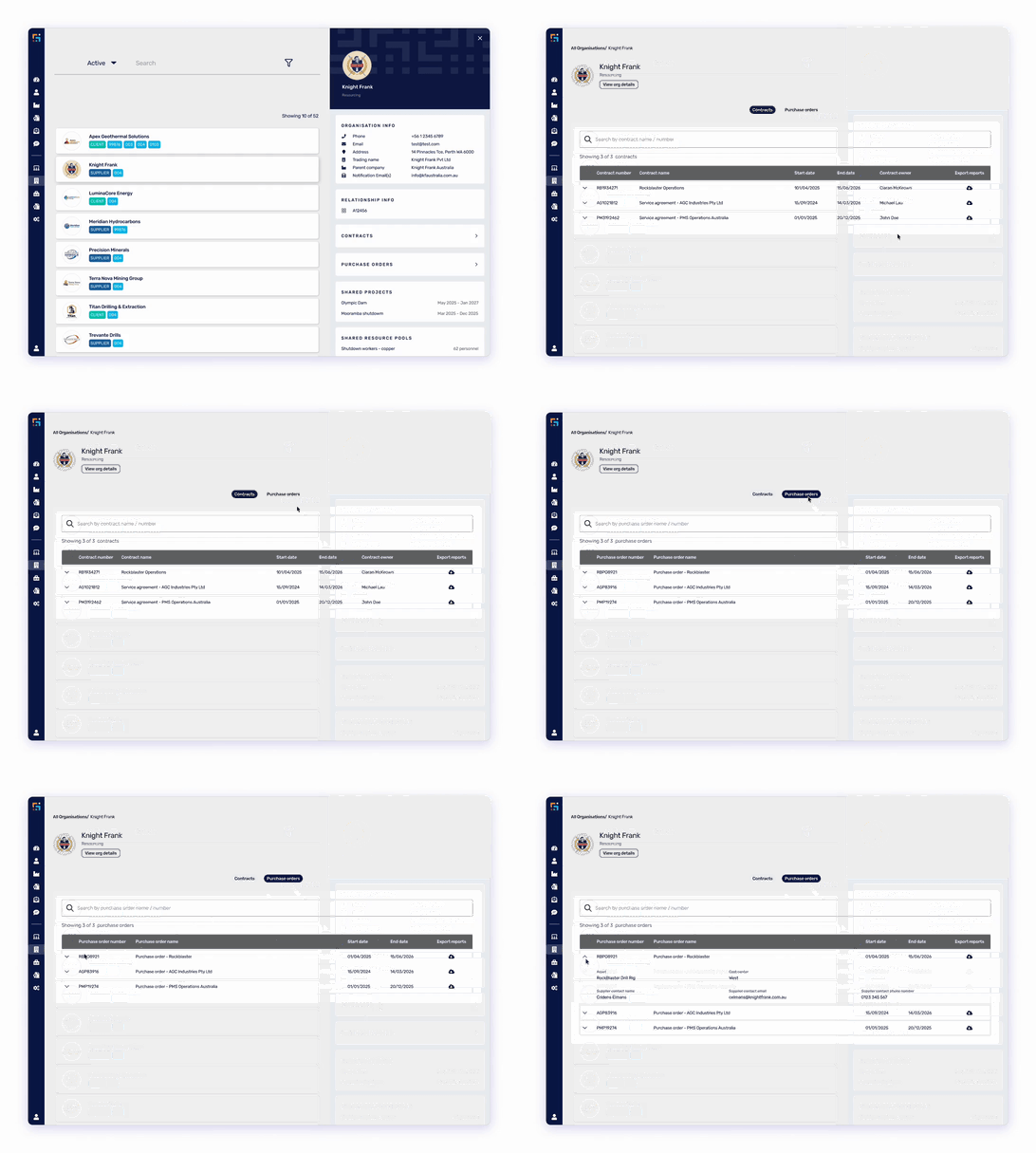
The challenge
Critical supplier details are often scattered across different systems, spreadsheets, and email threads, leading to operational inefficiencies for key user groups. Contract managers, labour relations teams, and compliance officers struggle to get a complete picture of supplier relationships without piecing together information from multiple sources.
This fragmented experience made supplier auditing time-consuming and increased the risk of missing critical information.
The solutions
We've enhanced the supplier auditing experience with a dedicated Contracts and Purchase Orders section directly on the supplier's profile.
Centralised contract visibility
Comprehensive purchase order tracking
Powerful export functionality The standout feature of this enhancement is the new export capability, enabling you to generate comprehensive reports that include:
Business impact
This feature is particularly valuable for:
Public Profile Enhancement: Instant On-Site Compliance Checks

The challenge
On-site safety and security require instant visibility into worker compliance. However, verifying worker qualifications traditionally requires:
For site supervisors, safety managers, and senior leaders conducting field visits, this creates friction between security requirements and operational efficiency.
The solution
MyPass has introduced Public Profile Enhancement, allowing Asset Owners to include specific project role information on the public profile of all associated personnel.
The capabilities
What's displayed When someone scans a worker's QR code, the public profile shows:
Compliance criteria Role information appears publicly only when:
Use cases
Site supervisors Verify worker qualifications without logging into the platform when conducting routine compliance checks of crews from multiple suppliers.
Senior leadership field visits Site managers, Asset Presidents, and executives can quickly verify compliance during safety walkarounds and field leadership activities.
Cross-supplier verification Validate qualifications for workers provided by suppliers who aren't MyPass customers, using the QR code as proof of compliance.
How it works
Business impact
To enable this feature for your organisation, please contact MyPass support.
We Want Your Feedback
Your input shapes our product roadmap. Tell us what you think about these new features and what you'd like to see next:
Thank you for being part of the MyPass community. We're excited to continue building solutions that make compliance management simpler, faster, and more effective.

MyPass Global, the industry platform for workforce competency assurance, announced it had raised A$7.5 million in Series A funding led by Australian venture capital firm OneVentures.




.png)